
Storage
Updated onSeptember 8, 2026
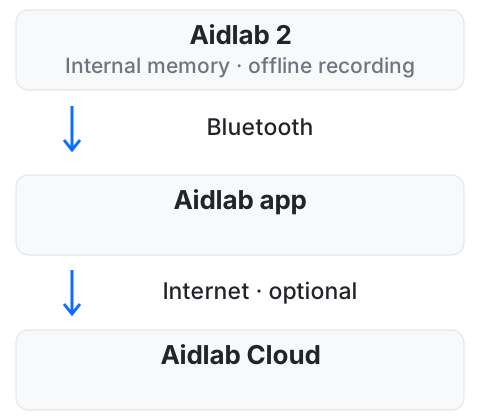
Aidlab 2 is available with 4 GB, 8 GB or 32 GB of internal memory. It can record selected signals without a continuous phone connection and transfer them after you reconnect.
Before recording without a phone
Connect Aidlab 2 to the app, check that measurements appear and configure your recording. The selected signals determine what is saved while the device is disconnected.
The amount of time you can record depends on the signals and their sampling settings. Memory size alone does not give a fixed recording duration. The battery must also last for the recording you plan.
Choose and use your memory
| Variant | Internal memory |
|---|---|
| Aidlab 2 | 4 GB |
| Aidlab 2 | 8 GB |
| Aidlab 2 | 32 GB |
A larger capacity leaves more room between synchronizations. Regularly synchronize your data instead of waiting for the memory to fill. Reconnecting lets the app receive stored data while the device continues collecting live measurements.
App and Cloud
Transferring data from Aidlab 2 to your phone is separate from sending it to Aidlab Cloud. Cloud synchronization requires an internet connection and must be enabled in the app.
Using your own software? See the SDK synchronization documentation.